1. First login
Conference organiser should sign in via XJTLU SSO. A user account will be created automatically after your first successful login.
2. Request submission and verification
Conference organiser should submit a permission request to their School/Academy Conference POC via email. The POC will review that the conference is genuine and compliant. Once confirmed, the POC will enable the relevant conference creation/publishing permissions for the organiser.
3. Conference creation and setup
After permissions are enabled, conference organisers can create a conference in Draft Conferences (Internal) folder and complete the conference details (e.g., registration, abstracts, programme/agenda). Once the information is finalised and ready for public release, organisers should move the conference to Public Conferences folder for publication.
4. Permission maintenance
To ensure system security and information accuracy, School/Academy Conference POCs are advised to periodically review organiser access and remove permissions for users who have left the University or are no longer involved in conference administration.
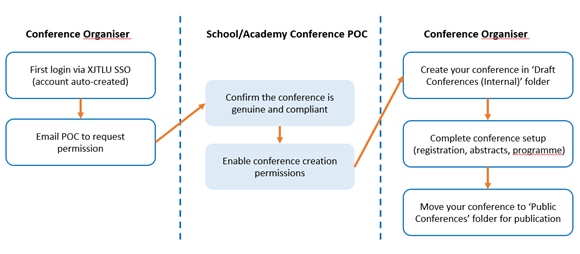
(Flowchat - Conference Creation Permission Process)
1. Find your School/Academy Conference POC: https://box.xjtlu.edu.cn/smart-link/02a7e7ba-890f-45d8-8096-358d3033192e/
2. POC changes/support: umc@xjtlu.edu.cn